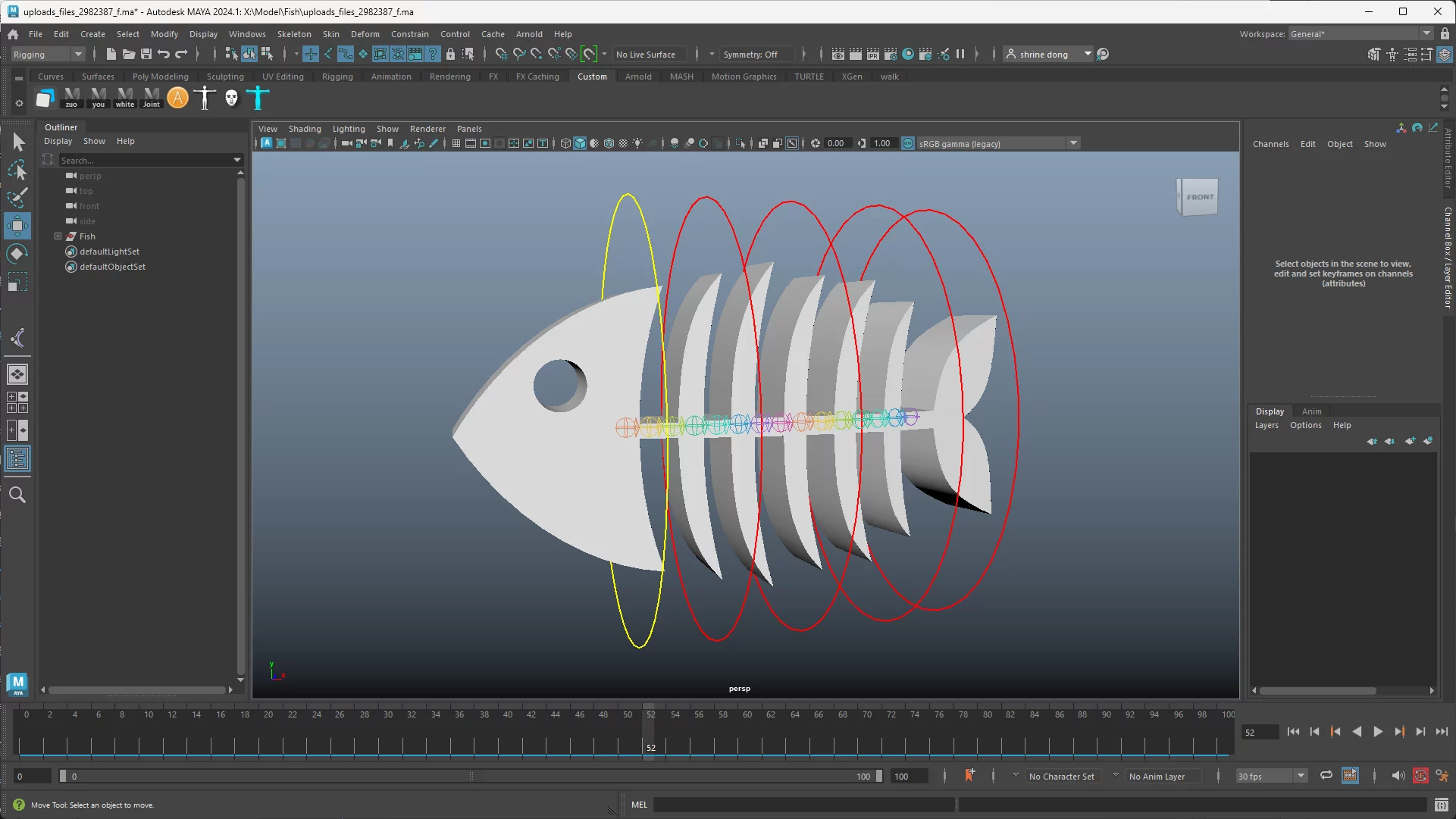
Maya Curve Rigger|线条类道具一键绑定(Rope / Tail / Tentacle Rig)
import maya.cmds as cmds
import maya.mel as mel
import math
import sys
from maya.cmds import*
class Curve_Rigger:
def __init__(self):
print("请选择起始和结束定位器 / Select start and end locators")
pass
def FolRivet(self):
sel=ls(sl=1)
index=len(sel)
shape=listRelatives(sel[-1],type='shape')[0]
if objExists("Rivet_Fol_Group"):
grp="Rivet_Fol_Group"
else:
grp=group(em=1,n="Rivet_Fol_Group")
for i in range(0,index-1):
loc=sel[i]
decompNode=shadingNode('decomposeMatrix',au=1)
if nodeType(shape)=='mesh':
cposNode=shadingNode('closestPointOnMesh',au=1)
connectAttr(shape+'.worldMatrix[0]',cposNode+'.inputMatrix')
connectAttr(shape+'.outMesh',cposNode+'.inMesh')
elif nodeType(shape)=='nurbsSurface':
cposNode=shadingNode('closestPointOnSurface',au=1)
connectAttr(shape+'.worldSpace',cposNode+'.inputSurface')
connectAttr(loc+'.worldMatrix[0]',decompNode+'.inputMatrix')
connectAttr(decompNode+'.outputTranslate',cposNode+'.inPosition')
UVal=getAttr(cposNode+'.parameterU')
VVal=getAttr(cposNode+'.parameterV')
follicle_name = loc + "_fol"
follicle_shape_name = follicle_name + "Shape"
# 创建毛囊 / Create follicle
follicle_shape = createNode("follicle", name=follicle_shape_name)
follicle = listRelatives(follicle_shape, p=1)[0]
rename(follicle,follicle_name)
if nodeType(shape)=='mesh':
connectAttr(shape + ".worldMesh[0]", follicle_shape + ".inputMesh")
connectAttr(shape+'.worldMatrix[0]',follicle_shape+'.inputWorldMatrix')
elif nodeType(shape)=='nurbsSurface':
connectAttr(shape + ".local", follicle_shape + ".inputSurface")
connectAttr(shape+'.worldMatrix[0]',follicle_shape+'.inputWorldMatrix')
setAttr(follicle_shape+'.parameterU',UVal)
setAttr(follicle_shape+'.parameterV',VVal)
connectAttr(follicle_shape+'.outTranslate',follicle+'.t')
connectAttr(follicle_shape+'.outRotate',follicle+'.r')
parentConstraint(follicle,loc,mo=1)
parent(follicle,grp)
delete(cposNode,decompNode)
def create_cylinder_with_locators(self,name, start_locator, end_locator, radius=0.5, divisions=20):
# 获取定位器的位置 / Get the positions of the locators
start_position = cmds.xform(start_locator, query=True, translation=True, worldSpace=True)
end_position = cmds.xform(end_locator, query=True, translation=True, worldSpace=True)
# 计算圆柱体的高度和方向向量 / Calculate the height and direction vector of the cylinder
height = math.sqrt(sum((end - start) ** 2 for start, end in zip(start_position, end_position)))
direction = [(end - start) / height for start, end in zip(start_position, end_position)]
# 使用指定参数创建圆柱体 / Create a cylinder with the specified parameters
cylinder = cmds.polyCylinder(n=name, radius=radius, height=height, subdivisionsY=divisions, axis=direction)[0]
# 将圆柱体定位在两个定位器的中点 / Position the cylinder at the midpoint between the locators
midpoint = [(start + end) / 2 for start, end in zip(start_position, end_position)]
cmds.move(midpoint[0], midpoint[1], midpoint[2], cylinder)
return cylinder
def create_curve_from_objects(self,objects):
store_positions = [cmds.xform(obj, query=True, worldSpace=True, translation=True) for obj in objects]
degree = 3 # 如需更改度数请在此修改 / Change the degree here if needed
build_curve = "curve -d {} ".format(degree)
for pos in store_positions:
build_curve += "-p {} {} {} ".format(pos[0], pos[1], pos[2])
return mel.eval(build_curve)
def create_locator_in_direction(self,locator1, locator2):
pos1 = cmds.pointPosition(locator1)
pos2 = cmds.pointPosition(locator2)
# 计算方向和距离 / Calculate direction and distance
direction_vector = [(pos2[0] - pos1[0]), (pos2[1] - pos1[1]), (pos2[2] - pos1[2])]
direction_length = math.sqrt(sum(v ** 2 for v in direction_vector))
normalized_direction = [(v / direction_length) * 10 * direction_length for v in direction_vector]
new_locator_pos = [pos1[i] + normalized_direction[i] for i in range(3)]
# 创建新定位器 / Create new locator
new_locator = cmds.spaceLocator(name="new_locator")[0]
cmds.move(new_locator_pos[0], new_locator_pos[1], new_locator_pos[2], new_locator)
return new_locator
def create_control_curve(self,pref, shape_type,obj,col):
if shape_type == 'circle':
ctrl = cmds.circle(ch=0, n=pref +obj.replace('Jnt','Ctrl'), r=0.5, nr=(1, 0, 0))[0]
elif shape_type == 'cube':
mel.eval('$ctrl =`curve -d 1 -p 0.5 0.5 0.5 -p 0.5 0.5 -0.5 -p -0.5 0.5 -0.5 -p -0.5 -0.5 -0.5 -p 0.5 -0.5 -0.5 -p 0.5 0.5 -0.5 -p -0.5 0.5 -0.5 -p -0.5 0.5 0.5 -p 0.5 0.5 0.5 -p 0.5 -0.5 0.5 -p 0.5 -0.5 -0.5 -p -0.5 -0.5 -0.5 -p -0.5 -0.5 0.5 -p 0.5 -0.5 0.5 -p -0.5 -0.5 0.5 -p -0.5 0.5 0.5 -k 0 -k 1 -k 2 -k 3 -k 4 -k 5 -k 6 -k 7 -k 8 -k 9 -k 10 -k 11 -k 12 -k 13 -k 14 -k 15 -n "'+pref +obj.replace('Jnt','Ctrl')+'" `;') # 立方体曲线定义 / Replace with cube curve definition
ctrl = cmds.rename(pref +obj.replace('Jnt','Ctrl'))
shape = cmds.pickWalk(d="down")[0]
cmds.rename(shape, ctrl + "Shape")
ctrl_sdk_grp = cmds.group(n=pref +obj.replace('Jnt','Ctrl')+'_SdkGrp')
ctrl_off_grp = cmds.group(n=pref +obj.replace('Jnt','Ctrl')+'_OffGrp')
# 自定义控制器外观 / Customize control appearance
cmds.setAttr(ctrl + '.overrideEnabled', 1)
cmds.setAttr(ctrl + '.overrideColor', col)
sub_ctrl = cmds.circle(ch=0, n=pref +obj.replace('Jnt','Sub_Ctrl'))[0]
sub_ctrl_sdk_grp = cmds.group(n=pref +obj.replace('Jnt','Sub_Ctrl')+'_SdkGrp')
sub_ctrl_off_grp = cmds.group(n=pref +obj.replace('Jnt','Sub_Ctrl')+'_OffGrp')
# 自定义子控制器外观 / Customize sub control appearance
cmds.setAttr(sub_ctrl + '.overrideEnabled', 1)
cmds.setAttr(sub_ctrl + '.overrideColor', 13)
cmds.parent(sub_ctrl_off_grp, ctrl)
cmds.addAttr(ctrl, ln='Sub_Ctrl_Vis', at='bool', h=0, k=1, r=1)
cmds.connectAttr(ctrl + '.Sub_Ctrl_Vis', sub_ctrl_off_grp + '.v')
delete(parentConstraint(obj,ctrl_off_grp,mo=0))
return ctrl
def create_joints_between_objects(self,num_joints, prefix=''):
joints = []
selObj=ls(sl=1)
start_obj = selObj[0]
end_obj = selObj[1]
for i in range(num_joints + 2):
select(cl=1)
t = float(i) / float(num_joints + 1)
joint_name = '{}_{:02d}_Jnt'.format(prefix, i)
new_joint = cmds.joint(name=joint_name)
start_pos = cmds.xform(start_obj, q=1, t=1, worldSpace=True)
end_pos = cmds.xform(end_obj, q=1, t=1, worldSpace=True)
joint_pos = [
start_pos[0] + (end_pos[0] - start_pos[0]) * t,
start_pos[1] + (end_pos[1] - start_pos[1]) * t,
start_pos[2] + (end_pos[2] - start_pos[2]) * t
]
cmds.xform(new_joint, translation=joint_pos, worldSpace=True)
if not i == num_joints + 1:
delete(aimConstraint(end_obj,new_joint,aim=(1,0,0),u=(0,1,0),wut='vector',wu=(0,1,0)))
else:
delete(aimConstraint(start_obj,end_obj,new_joint,aim=(-1,0,0),u=(0,1,0),wut='vector',wu=(0,1,0)))
select(new_joint)
if i>>0:
makeIdentity( a = True, t =0, r= 1, s =0, n= 0, pn= 1);
joints.append(new_joint)
return joints
def create_ui(self,path=''):
window_name = "RigNet_Tools"
if cmds.window(window_name, exists=True):
cmds.deleteUI(window_name)
cmds.window(window_name, title="曲线绑定工具 / Curve Rigger Tools",w=350,h=430)
form=cmds.formLayout(numberOfDivisions=100,w = 350)
txt=cmds.text(label="蒙皮关节数量 / Number of Skn Joints:")
skn_joints_field = cmds.intField(minValue=1, value=10,w=80)
FkTxt=cmds.text(label="控制器数量 / Number of Controls:")
flst_field = cmds.intField(minValue=1, value=5,w=80)
IKChk=cmds.checkBox(label="IK控制器 / IK Controls")
TwistChk=cmds.checkBox(label="启用扭曲 / Enable Twist")
FKChk=cmds.checkBox(label="FK控制器 / FK Controls")
RevChk=cmds.checkBox(label="反向FK控制器 / RevFK Controls")
PathChk=cmds.checkBox(label="路径控制器 / Path Controls",cc=lambda state: self.enable_flst_field(state,path_joints_field))
PText = cmds.text(label="路径控制器数量 / Number of Path Controls:",)
path_joints_field = cmds.intField(minValue=1, value=50,en=0,w=80)
but=cmds.button(label="创建绑定 / Create Rig", command=lambda args: self.create_rig(skn_joints_field, flst_field,path_joints_field,IKChk,FKChk,RevChk,PathChk,TwistChk),bgc=(0.15,0.15,0.15),w=310,h=40)
transfer_but=cmds.button(label="转移蒙皮权重 / Transfer Skin Weights", command=lambda args: self.transfer_skin_weights(),bgc=(0.2,0.3,0.2),w=310,h=40)
cmds.formLayout( form, edit=True,
attachForm=[
(txt, 'top',20),
(txt, 'left',20),
(skn_joints_field, 'top',17),
(skn_joints_field, 'left',260),
(flst_field, 'top',37),
(flst_field, 'left',260),
(IKChk, 'top', 65),
(IKChk, 'left', 20),
(TwistChk, 'top', 65),
(TwistChk, 'left', 200),
(FkTxt, 'top', 40),
(FkTxt, 'left', 20),
(FKChk, 'top', 90),
(FKChk, 'left', 20),
(RevChk, 'top', 90),
(RevChk, 'left', 200),
(PathChk, 'top', 140),
(PathChk, 'left', 20),
(PText, 'top', 115),
(PText, 'left', 20),
(path_joints_field, 'top', 112),
(path_joints_field, 'left', 260),
(but, 'top', 170),
(but, 'left', 20),
(transfer_but, 'top', 220),
(transfer_but, 'left', 20)
])
cmds.showWindow(window_name)
def enable_flst_field(self,state, path_joints_field):
cmds.intField(path_joints_field, edit=True, enable=state,bgc=(0.0,0.0,0.0))
def transfer_skin_weights(self):
# 获取选择的模型 / Get selected model
selection = cmds.ls(sl=True)
if not selection:
cmds.warning("请先选择目标模型 / Please select target model first")
return
# 检查源模型是否存在 / Check if source model exists
source_mesh = "Dummy_Mesh"
if not cmds.objExists(source_mesh):
cmds.warning("源模型 'Dummy_Mesh' 不存在 / Source model 'Dummy_Mesh' does not exist")
return
# 获取源模型的蒙皮簇 / Get skin cluster from source mesh
source_skin_cluster = None
# 获取网格的shape节点 / Get mesh shape node
source_shapes = cmds.listRelatives(source_mesh, shapes=True, type='mesh')
if not source_shapes:
cmds.warning("源模型没有网格形状 / Source model has no mesh shape")
return
source_shape = source_shapes[0]
# 从shape节点查找蒙皮簇 / Find skin cluster from shape node
skin_clusters = cmds.listConnections(source_shape, type='skinCluster', source=True, destination=False)
if not skin_clusters:
# 尝试从历史记录中查找 / Try to find from history
history = cmds.listHistory(source_shape, pruneDagObjects=True)
if history:
for node in history:
if cmds.nodeType(node) == 'skinCluster':
skin_clusters = [node]
break
if skin_clusters:
source_skin_cluster = skin_clusters[0]
else:
cmds.warning("源模型没有蒙皮簇 / Source model has no skin cluster")
return
# 获取蒙皮关节 / Get skin joints
skin_joints = cmds.skinCluster(source_skin_cluster, query=True, influence=True)
if not skin_joints:
cmds.warning("无法获取蒙皮关节 / Cannot get skin joints")
return
# 处理每个选择的对象 / Process each selected object
for target_mesh in selection:
# 检查是否为网格 / Check if it's a mesh
target_shapes = cmds.listRelatives(target_mesh, shapes=True, type='mesh')
if not target_shapes:
cmds.warning("'{}' 不是网格对象 / '{}' is not a mesh object".format(target_mesh, target_mesh))
continue
target_shape = target_shapes[0]
# 检查目标模型是否已有蒙皮簇 / Check if target already has skin cluster
target_skin_cluster = None
target_skin_clusters = cmds.listConnections(target_shape, type='skinCluster', source=True, destination=False)
if not target_skin_clusters:
# 尝试从历史记录中查找 / Try to find from history
history = cmds.listHistory(target_shape, pruneDagObjects=True)
if history:
for node in history:
if cmds.nodeType(node) == 'skinCluster':
target_skin_clusters = [node]
break
if target_skin_clusters:
target_skin_cluster = target_skin_clusters[0]
# 如果目标模型没有蒙皮簇,创建一个 / Create skin cluster if target doesn't have one
if not target_skin_cluster:
# 创建新的蒙皮簇 / Create new skin cluster
target_skin_cluster = cmds.skinCluster(skin_joints, target_mesh, tsb=True, mi=1)[0]
# 转移蒙皮权重 / Transfer skin weights
try:
cmds.copySkinWeights(
sourceSkin=source_skin_cluster,
destinationSkin=target_skin_cluster,
noMirror=True,
surfaceAssociation='closestPoint',
influenceAssociation=['oneToOne', 'closestJoint']
)
print("成功转移蒙皮权重: {} / Successfully transferred skin weights: {}".format(target_mesh, target_mesh))
except Exception as e:
cmds.warning("转移蒙皮权重失败: {} / Failed to transfer skin weights: {}".format(str(e), str(e)))
cmds.select(selection, r=True)
def create_rig(self,skn_joints_field, flst_field,path_joints_field,IKChk,FKChk,RevChk,PathChk,TwistChk):
IK=cmds.checkBox(IKChk,q=1,v=1)
FK=cmds.checkBox(FKChk,q=1,v=1)
Rev=cmds.checkBox(RevChk,q=1,v=1)
Path=cmds.checkBox(PathChk,q=1,v=1)
Twst=cmds.checkBox(TwistChk,q=1,v=1)
print (IK,FK,Rev,Path)
num_skn_joints = cmds.intField(skn_joints_field, query=True, value=True)
num_flst = cmds.intField(flst_field, query=True, value=True)
pth_jnt=cmds.intField(path_joints_field,q=1,value=1)
initLoc=ls(sl=1)
# 创建蒙皮关节 / Create SKn Jnt #
Jlst=self.create_joints_between_objects(num_skn_joints-2,'Skn')
select(Jlst[0])
FreezeTransformations()
# 将'locator1'和'locator2'替换为你的定位器名称 / Replace 'locator1' and 'locator2' with the names of your locators
start_locator = initLoc[0]
end_locator = initLoc[1]
# 调用函数创建圆柱体 / Call the function to create the cylinder
cylinder = self.create_cylinder_with_locators("Dummy_Mesh", start_locator, end_locator, radius=0.3, divisions=num_skn_joints-1)
select(Jlst,cylinder)
SmoothBindSkin()
a=-1
select(cl=1)
for i in range(len(Jlst)):
jj=cmds.duplicate(Jlst[a],n='IK_'+Jlst[a])
grp = group(em=1,n= Jlst[a]+'_Conn_Grp')
delete(parentConstraint(Jlst[a],grp,mo=0))
parent(Jlst[a],grp)
if i>0:
parent('IK_'+Jlst[a+1],'IK_'+Jlst[a])
#parent(Jlst[a+1]+'_Conn_Grp',Jlst[a])
parentConstraint('IK_'+Jlst[a],grp,mo=1)
#connectAttr('IK_'+Jlst[a]+'.r',grp+'.r')
a=a-1
Ik_OffGrp=group(em=1,n='IK_Offset_Val_Grp')
delete(parentConstraint(Jlst[0],Ik_OffGrp,mo=0))
select(initLoc)
# 创建驱动IK关节 / Create Drv IK Jnt #
Dlst=self.create_joints_between_objects(num_flst-2,'Drv')
self.create_curve_from_objects(Dlst)
crv=ls(sl=1)[0]
refresh()
select('IK_'+Jlst[0])
FreezeTransformations()
select('IK_'+Jlst[0],'IK_'+Jlst[-1])
refresh()
# 创建IK样条 / Create IK Spline #
ik=ikHandle(sol = 'ikSplineSolver', pcv=0, c=crv, ccv= 0)
select(Dlst,crv)
SmoothBindSkin()
main_Ctrl = circle(ch=0,n='Main_Ctrl',r=5,nr=(0,1,0))[0]
main_grp = group(n='Main_Ctrl_Grp')
#delete(parentConstraint(initLoc[0],initLoc[1],main_grp,mo=0))
parent('IK_'+Jlst[0],Ik_OffGrp)
for jJnt in Jlst:
parent(jJnt+'_Conn_Grp',Ik_OffGrp)
# 添加拉伸功能 / Adding Stretch #
addAttr(main_Ctrl,ln='Maintain_Length',min=0,max=1,k=1,at='float')
crvInfo=arclen(crv,ch=1)
dis=getAttr(crvInfo+'.arcLength')
StrGlMD=createNode('multiplyDivide',n='Wire_StrVGlobal_MD')
connectAttr(crvInfo+'.arcLength',StrGlMD+'.input1X')
connectAttr(main_Ctrl+'.sx',StrGlMD+'.input2X')
setAttr(StrGlMD+'.operation',2)
StrMD=createNode('multiplyDivide',n='Wire_StrVal_MD')
setAttr(StrMD+'.input2X',dis)
connectAttr(StrGlMD+'.outputX',StrMD+'.input1X')
setAttr(StrMD+'.operation',2)
Tval=getAttr('IK_'+Jlst[-1]+'.tx')
StrValMD=createNode('multiplyDivide',n='Wire_Stretchy_MD')
setAttr(StrValMD+'.input1X',Tval)
connectAttr(StrMD+'.outputX',StrValMD+'.input2X')
setAttr(StrValMD+'.operation',1)
StrcBlnd=createNode('blendColors',n='Wire_StrSwitch_MD')
setAttr('Wire_StrSwitch_MD.color2R',Tval)
connectAttr(StrValMD+'.outputX','Wire_StrSwitch_MD.color1R')
connectAttr(main_Ctrl+'.Maintain_Length',StrcBlnd+'.blender')
for i in range(1,len(Jlst)):
connectAttr(StrcBlnd+'.outputR','IK_'+Jlst[i]+'.tx')
FkLst=[]
IKCtrl=[]
RevLst=[]
ConsLst=[]
IKGrp=[]
pthLst=[]
i=0
if FK == True:
if Rev == True:
IK = True
if IK == True:
for DJnt in Dlst:
Ctrl = self.create_control_curve('IK_', 'circle',DJnt,17)
IKCtrl.append(Ctrl)
if FK == True:
Flst=list(Dlst)
print(Dlst)
Flst.reverse()
print(Flst)
for DJnt in Flst:
Ctrl = self.create_control_curve('FK_', 'cube',DJnt,20)
FkLst.append(Ctrl)
Grp=group(em=1,n=Ctrl.replace('Ctrl','Drv_OffGrp'))
delete(parentConstraint(Ctrl,Grp,mo=0))
if i>>0:
parent(FkLst[i-1].replace('Ctrl','Ctrl_OffGrp'),Ctrl)
parent(FkLst[i-1].replace('Ctrl','Drv_OffGrp'),Grp)
i=i+1
connectAttr(Grp+'.t',Ctrl.replace('Ctrl','Ctrl_OffGrp')+'.t')
connectAttr(Grp+'.r',Ctrl.replace('Ctrl','Ctrl_OffGrp')+'.r')
connectAttr(Grp+'.s',Ctrl.replace('Ctrl','Ctrl_OffGrp')+'.s')
i=0
if Rev == True:
Revlst=list(Dlst)
print(Revlst)
for DJnt in Revlst:
Ctrl = self.create_control_curve('RevFK_', 'cube',DJnt,21)
RevLst.append(Ctrl)
Grp=group(em=1,n=Ctrl.replace('Ctrl','Drv_OffGrp'))
delete(parentConstraint(Ctrl,Grp,mo=0))
if i>>0:
parent(RevLst[i-1].replace('Ctrl','Ctrl_OffGrp'),Ctrl)
parent(RevLst[i-1].replace('Ctrl','Drv_OffGrp'),Grp)
i=i+1
connectAttr(Grp+'.t',Ctrl.replace('Ctrl','Ctrl_OffGrp')+'.t')
connectAttr(Grp+'.r',Ctrl.replace('Ctrl','Ctrl_OffGrp')+'.r')
connectAttr(Grp+'.s',Ctrl.replace('Ctrl','Ctrl_OffGrp')+'.s')
if IK == True:
i=0
for DJnt in Dlst:
parentConstraint(IKCtrl[i].replace('Ctrl','Sub_Ctrl'),DJnt,mo=1)
i=i+1
elif FK == True:
i=0
for DJnt in Flst:
parentConstraint(FkLst[i].replace('Ctrl','Sub_Ctrl'),DJnt,mo=1)
i=i+1
elif Rev == True:
i=0
for DJnt in Dlst:
parentConstraint(RevLst[i].replace('Ctrl','Sub_Ctrl'),DJnt,mo=1)
i=i+1
# 其余绑定创建代码 / Rest of the rig creation code #
a=0
b=-1
if IK:
for ikctrl in IKCtrl:
IKGrp.append(ikctrl.replace('Ctrl','Ctrl_OffGrp'))
par=[]
if FkLst:
par.append(FkLst[b])
if RevLst:
par.append(RevLst[a])
if par:
constraint = cmds.parentConstraint(par, ikctrl.replace('Ctrl','Ctrl_OffGrp'),mo=1)[0]
ConsLst.append(constraint)
a=a+1
b=b-1
if FK and Rev == True:
addAttr(main_Ctrl,ln='RevFK',min=0,max=10,k=1,at='float')
inVal=0
val=10.0/len(Dlst)
sel =list(IKCtrl)
for obj in sel:
Nobj=obj
obj = obj.replace('Ctrl','Ctrl_OffGrp')
par=parentConstraint(Nobj.replace('IK_','FK_'),Nobj.replace('IK_','RevFK_'),obj,mo=1)[0]
select(par)
setDrivenKeyframe(cd="Main_Ctrl.RevFK",at=Nobj.replace('IK_','FK_')+'W0',dv=inVal,v=1)
setDrivenKeyframe(cd="Main_Ctrl.RevFK",at=Nobj.replace('IK_','FK_')+'W0',dv=inVal+val,v=0)
select(Nobj.replace('IK_','FK_')+'Shape')
setDrivenKeyframe(cd="Main_Ctrl.RevFK",at='.v',dv=inVal,v=1)
setDrivenKeyframe(cd="Main_Ctrl.RevFK",at='.v',dv=inVal+val,v=0)
select(par)
setDrivenKeyframe(cd="Main_Ctrl.RevFK",at=Nobj.replace('IK_','RevFK_')+'W1',dv=inVal,v=0)
setDrivenKeyframe(cd="Main_Ctrl.RevFK",at=Nobj.replace('IK_','RevFK_')+'W1',dv=inVal+val,v=1)
select(Nobj.replace('IK_','RevFK_')+'Shape')
setDrivenKeyframe(cd="Main_Ctrl.RevFK",at='.v',dv=inVal,v=0)
setDrivenKeyframe(cd="Main_Ctrl.RevFK",at='.v',dv=inVal+val,v=1)
inVal=inVal+val
select (Jlst)
sets(n='Bind_Skin')
pJnt=listRelatives(Jlst[0],p=1)[0]
select(Dlst)
group(n='Jnt_Grp')
scaleConstraint('Main_Ctrl','Jnt_Grp',mo=1)
select(crv,ik[0])
group(n='Extra_Grp')
dGrp=group(em=1,n='Drv_Null_Group')
parent(dGrp,'Extra_Grp')
parentConstraint('Main_Ctrl',dGrp,mo=1)
scaleConstraint('Main_Ctrl',dGrp,mo=1)
if IK == True:
addAttr(main_Ctrl,ln='IK_Ctrl_Vis',at='bool',k=1)
group(IKGrp,n='IK_Ctrl_Grp')
connectAttr('Main_Ctrl.IK_Ctrl_Vis','IK_Ctrl_Grp.v')
parent('IK_Ctrl_Grp','Main_Ctrl')
if FK == True:
select(FkLst[-1].replace('Ctrl','Ctrl_OffGrp'))
FkGrp=group(n='Fk_Ctrl_Group')
addAttr(main_Ctrl,ln='FK_Ctrl_Vis',at='bool',k=1)
connectAttr('Main_Ctrl.FK_Ctrl_Vis',FkGrp+'.v')
parent(FkGrp,'Main_Ctrl')
parent("FK_Drv_00_Drv_OffGrp",dGrp)
if Rev == True:
select(RevLst[-1].replace('Ctrl','Ctrl_OffGrp'))
RevFkGrp=group(n='RevFk_Ctrl_Group')
try:
addAttr(main_Ctrl,ln='FK_Ctrl_Vis',at='bool',k=1)
except: pass
connectAttr('Main_Ctrl.FK_Ctrl_Vis',RevFkGrp+'.v')
parent(RevFkGrp,'Main_Ctrl')
parent(RevLst[-1].replace('Ctrl','Drv_OffGrp'),dGrp)
if Path == True:
addAttr(main_Ctrl,ln='Path_Ctrl_Vis',at='bool',k=1)
self.create_locator_in_direction(initLoc[0],initLoc[1])
select(initLoc[0],"new_locator")
PathLst=self.create_joints_between_objects(pth_jnt-2,'Path')
select(PathLst)
Pcrv=self.create_curve_from_objects(PathLst)
noCv=len(PathLst)-1
rebuildCurve(Pcrv,ch=1,rpo=1,rt=0,end=1,kr=0,kcp=0,kep=1,kt=0,s=noCv,d=3,tol=0.01)
i=0
PathLst.reverse()
for PJnt in PathLst:
Ctrl = self.create_control_curve('', 'circle',PJnt,13)
pthLst.append(Ctrl)
parent(PJnt,Ctrl.replace('Ctrl','Sub_Ctrl'))
if i>>0:
try:
parent(pthLst[i-1].replace('Ctrl','Ctrl_OffGrp'),Ctrl)
except:
pass
i=i+1
parent(pthLst[-1].replace('Ctrl','Ctrl_OffGrp'),'Main_Ctrl')
connectAttr('Main_Ctrl.Path_Ctrl_Vis',pthLst[-1].replace('Ctrl','Ctrl_OffGrp')+'.v')
DummyJnt=duplicate(PathLst[0],n='Dummy_Jnt')[0]
delete(pointConstraint(Pcrv,DummyJnt,mo=0))
DCrv=duplicate(Pcrv)[0]
setAttr(DummyJnt+'.tz',0.5)
delete(pointConstraint(DummyJnt,Pcrv,mo=0))
setAttr(DummyJnt+'.tz',-0.5)
delete(pointConstraint(DummyJnt,DCrv,mo=0))
delete(DummyJnt)
select(Pcrv,DCrv,PathLst)
SmoothBindSkin()
select(Pcrv,DCrv)
surf=loft(n='Path_Surface')
DeleteHistory(surf[0])
select(surf[0],PathLst)
skinCluster(PathLst,surf[0],tsb=1,mi=1)
print(surf)
if not FK and not Rev == True:
if not IK:
select(Dlst,surf[0])
self.FolRivet()
else:
print('不存在 / Not Present')
select(IKGrp,surf[0])
self.FolRivet()
if FK:
select("FK_Drv_*_Drv_OffGrp",surf[0])
self.FolRivet()
if Rev:
select("RevFK_Drv_*_Drv_OffGrp",surf[0])
self.FolRivet()
# 创建移动绑定设置 / Create traveling Rig setup
addAttr(main_Ctrl,ln='Travel',min=0,max=10,k=1,at='float')
if FK:
fol=ls("FK_Drv_*_Drv_OffGrp_fol")
initval=getAttr(fol[-1]+"Shape.parameterV")
Diff=1.0-initval
for follicle in fol:
shp=listRelatives(follicle,c=1,f=1)[0]
inValue=getAttr(shp+'.parameterV')
select(shp)
setDrivenKeyframe(cd="Main_Ctrl.Travel",at='parameterV',dv=0,v=inValue)
setDrivenKeyframe(cd="Main_Ctrl.Travel",at='parameterV',dv=10,v=inValue+Diff)
if Rev:
fol=ls("RevFK_Drv_*_Drv_OffGrp_fol")
initval=getAttr(fol[-1]+"Shape.parameterV")
Diff=1.0-initval
for follicle in fol:
shp=listRelatives(follicle,c=1,f=1)[0]
inValue=getAttr(shp+'.parameterV')
select(shp)
setDrivenKeyframe(cd="Main_Ctrl.Travel",at='parameterV',dv=0,v=inValue)
setDrivenKeyframe(cd="Main_Ctrl.Travel",at='parameterV',dv=10,v=inValue+Diff)
if not FK and not Rev == True:
if not IK:
fol=ls("Drv_*_Jnt_fol")
initval=getAttr(fol[-1]+"|follicleShape.parameterV")
Diff=1.0-initval
for follicle in fol:
shp=listRelatives(follicle,c=1,f=1)[0]
inValue=getAttr(shp+'.parameterV')
select(shp)
setDrivenKeyframe(cd="Main_Ctrl.Travel",at='parameterV',dv=0,v=inValue)
setDrivenKeyframe(cd="Main_Ctrl.Travel",at='parameterV',dv=10,v=inValue+Diff)
if IK:
fol=ls("IK_Drv_*_Ctrl_OffGrp_fol")
initval=getAttr(fol[-1]+"Shape.parameterV")
Diff=1.0-initval
for follicle in fol:
shp=listRelatives(follicle,c=1,f=1)[0]
inValue=getAttr(shp+'.parameterV')
select(shp)
setDrivenKeyframe(cd="Main_Ctrl.Travel",at='parameterV',dv=0,v=inValue)
setDrivenKeyframe(cd="Main_Ctrl.Travel",at='parameterV',dv=10,v=inValue+Diff)
# 在蒙皮关节上添加扭曲 / Adding Twist on Skin Jnts
if Twst:
select(cl=1)
DummyJnt=duplicate(Jlst[0],n='Dummy_Jnt')[0]
delete(pointConstraint(crv,DummyJnt,mo=0))
TlocLst=[]
DnumJnt=len(Dlst)-1
LCrv=duplicate(crv)[0]
rebuildCurve(LCrv,ch=1,rpo=1,rt=0,end=1,kr=0,kcp=0,kep=1,kt=0,s=DnumJnt,d=3,tol=0.01)
RCrv=duplicate(LCrv)[0]
axis=['tx','ty','tz']
for ax in axis:
setAttr(LCrv+'.'+ax,l=0)
setAttr(RCrv+'.'+ax,l=0)
setAttr(DummyJnt+'.tz',0.5)
delete(pointConstraint(DummyJnt,LCrv,mo=0))
setAttr(DummyJnt+'.tz',-0.5)
delete(pointConstraint(DummyJnt,RCrv,mo=0))
delete(DummyJnt)
select(LCrv,RCrv)
Tsurf=loft(n='Twist_Surface')
DeleteHistory(Tsurf[0])
select(Tsurf[0],Dlst)
skinCluster(Dlst,Tsurf[0],tsb=1,mi=1)
for SknJnt in Jlst:
Tloc=spaceLocator(n=SknJnt.replace('Jnt','_Twst_Loc'))[0]
Tgrp=group(n=Tloc+'_Grp')
TlocLst.append(Tgrp)
delete(parentConstraint(SknJnt,Tgrp,mo=0))
parentConstraint(Tloc,SknJnt,st=('x','y','z'),sr=('y','z'),mo=1)
select(TlocLst,Tsurf[0])
self.FolRivet()
for grp in TlocLst:
delete(listRelatives(grp,ad=1,type='constraint'))
parent(grp,grp+'_fol')
parent('Twist_Surface','Extra_Grp')
delete(LCrv,RCrv)
# 创建外层控制器并整理层级 / Create outer controllers and organize hierarchy
select(cl=True) # 清除选择,确保组是空的 / Clear selection to ensure groups are empty
# 创建中间层控制器 / Create middle layer controller
middle_Ctrl = circle(ch=0,n='Middle_Ctrl',r=6,nr=(0,1,0))[0]
select(cl=True) # 清除选择 / Clear selection
middle_Ctrl_off_grp = group(em=True, n='Middle_Ctrl_OffGrp')
delete(parentConstraint(main_Ctrl,middle_Ctrl_off_grp,mo=0))
setAttr(middle_Ctrl + '.overrideEnabled', 1)
setAttr(middle_Ctrl + '.overrideColor', 14) # 黄色 / Yellow
# 创建最外层控制器 / Create outer layer controller
select(cl=True) # 清除选择 / Clear selection
outer_Ctrl = circle(ch=0,n='Outer_Ctrl',r=7,nr=(0,1,0))[0]
select(cl=True) # 清除选择 / Clear selection
outer_Ctrl_off_grp = group(em=True, n='Outer_Ctrl_OffGrp')
delete(parentConstraint(middle_Ctrl,outer_Ctrl_off_grp,mo=0))
setAttr(outer_Ctrl + '.overrideEnabled', 1)
setAttr(outer_Ctrl + '.overrideColor', 18) # 红色 / Red
# 建立层级关系 / Establish hierarchy: Outer_Ctrl -> Middle_Ctrl -> Main_Ctrl_Grp
# 从内到外建立层级:先将 Main_Ctrl_Grp 放入 Middle_Ctrl
main_grp_parent = listRelatives(main_grp, p=True)
if not main_grp_parent or main_grp_parent[0] != middle_Ctrl:
parent(main_grp, middle_Ctrl)
# 然后将 Middle_Ctrl 放入其 OffGrp
middle_Ctrl_parent = listRelatives(middle_Ctrl, p=True)
if not middle_Ctrl_parent or middle_Ctrl_parent[0] != middle_Ctrl_off_grp:
parent(middle_Ctrl, middle_Ctrl_off_grp)
# 将 Middle_Ctrl_OffGrp 放入 Outer_Ctrl
middle_off_grp_parent = listRelatives(middle_Ctrl_off_grp, p=True)
if not middle_off_grp_parent or middle_off_grp_parent[0] != outer_Ctrl:
parent(middle_Ctrl_off_grp, outer_Ctrl)
# 将 Outer_Ctrl 放入其 OffGrp
outer_Ctrl_parent = listRelatives(outer_Ctrl, p=True)
if not outer_Ctrl_parent or outer_Ctrl_parent[0] != outer_Ctrl_off_grp:
parent(outer_Ctrl, outer_Ctrl_off_grp)
# 清理 / Cleanup
parent(Ik_OffGrp,'Jnt_Grp')
delete(initLoc)
if Path:
delete(Pcrv,DCrv,'new_locator')
parent('Path_Surface','Extra_Grp')
try:
parent('Rivet_Fol_Group','Extra_Grp')
except:pass
select('Dummy_Mesh')
RefGrp=group(n='Ref_Geo_Grp')
select(RefGrp,'Outer_Ctrl_OffGrp','Jnt_Grp','Extra_Grp')
group(n='Rig_Grp')
setAttr('Extra_Grp.v',0)
setAttr('Jnt_Grp.v',0)
rope_rig_instance = Curve_Rigger()
rope_rig_instance.create_ui()This video demonstrates how to rig flexible props such as rope, tail, tentacle, chain and vine in Maya using Curve Rigger.
本期视频演示如何在 Maya 中,使用 Curve Rigger 快速绑定线条类道具(绳子、尾巴、触手、藤蔓等)。
With only 2 locators, you can automatically create joints, FK / IK, Reverse FK, stretch, twist and path animation controls.
只需要 2 个定位器,即可一键生成骨骼、FK / IK、反向 FK、拉伸、扭曲以及路径动画控制。
⚠️ This tool rigs flexible props USING curves, not rigging the curve itself.
⚠️ 本工具是“通过曲线来绑定道具”,而不是去绑定曲线本身。
🔹 Tool Features / 功能亮点
- One-click rig for flexible props (Rope / Tail / Tentacle / Vine / Chain)
- FK / IK / Reverse FK switching
- Stretch & twist control
- Path-based animation control
- Auto skin and one-click skin weight transfer
- Bilingual UI (Chinese / English)
- 线条类道具一键自动绑定
- 支持 FK / IK / 反向 FK 切换
- 支持拉伸、扭曲控制
- 路径动画控制系统
- 蒙皮权重一键转移
- 中英文双语界面优化
🔹 Suitable For / 适用类型
- Rope / Cable / Hose rig
- Tail & Tentacle rig
- Vine, whip and flexible props
- Animation, game and cartoon production
- 绳子、管线、软管类道具
- 尾巴、触手类结构
- 藤蔓、鞭子等线条道具
- 动画、游戏、卡通项目
🔹 Workflow Overview / 绑定流程
- Place 2 locators to define the start and end of the prop
- Run Curve Rigger to generate the rig automatically
- Animate using FK, IK or path controls
- 放置 2 个定位器作为起点和终点
- 运行 Curve Rigger 自动生成绑定
- 使用 FK / IK 或路径控制进行动画
🔹 Software
Autodesk Maya 2018+